[CKS] Supply Chain Security (2)
KubeLinter는 Kubernetes Manifest 파일을 자동으로 검사하여 보안 문제, 리소스 부족, 모범 사례 위반 등을 식별합니다. CI/CD 파이프라인에 통합하여 배포 전 구성 문제를 미리 방지할 수 있습니다.
![[CKS] Supply Chain Security (2)](https://images.unsplash.com/photo-1684351548178-8f3628f83d26?crop=entropy&cs=tinysrgb&fit=max&fm=jpg&ixid=M3wxMTc3M3wwfDF8c2VhcmNofDl8fExpbnR8ZW58MHx8fHwxNzY4OTE2NTE4fDA&ixlib=rb-4.1.0&q=80&w=1200)
개요
아래 강의를 듣고 정리했습니다.
KubeLinter
Kubernetes 배포 구성 문제를 파악하고 모범 사례 준수를 보장합니다. Manifest 파일 분석, 잠재적 위험을 수행하여 보안과 효율성 안정성을 향상시킵니다.
apiVersion: apps/v1
kind: Deployment
metadata:
  name: my-app
spec:
  replicas: 1
  selector:
    matchLabels:
      app: my-app
  template:
    metadata:
      labels:
        app: my-app
    spec:
      containers:
      - name: app-container
        image: my-app-image:latest
        ports:
        - containerPort: 8080
- 하나의 Replica만 사용
latest태그를 사용- Resource
Request/Limit,Context,Probe등
| 구분 | Liveness Probe | Readiness Probe | Startup Probe |
|---|---|---|---|
| 질문 | "살아있나?" | "준비됐나?" | "시작됐나?" |
| 실패 시 | 컨테이너 재시작 | 트래픽 차단 | 컨테이너 재시작 |
| 실행 시점 | 주기적 (계속) | 주기적 (계속) | 시작 시만 |
| 주 용도 | 데드락 복구 | 과부하/초기화 대기 | 느린 시작 앱 |
KubeLinter를 통해 자동화된 Lint 검사와 권장 사항을 확인할 수 있습니다
- Readiness / Liveness Probe
- 단일 복제본만 사용하는 경우 경고
- 필요한 보안 컨텍스트를 포함할 것을 권장
- 컨테이너 이미지에
latest태그 사용을 금지하는 규칙 적용 - 적절한 요청과 제한을 확인하여 리소스 정의의 유효성 검사 수행
이를 통해 잘못된 설정을 방지하고 사용자 지정 규칙 기반한 보안을 강화할 수 있습니다.
Kubernetes 구성 파일에서 lint 명령을 실행합니다.
cd path/to/k8s-configs
kube-linter lint .
CI/CD에 통합되는 단계는 다음과 같습니다.
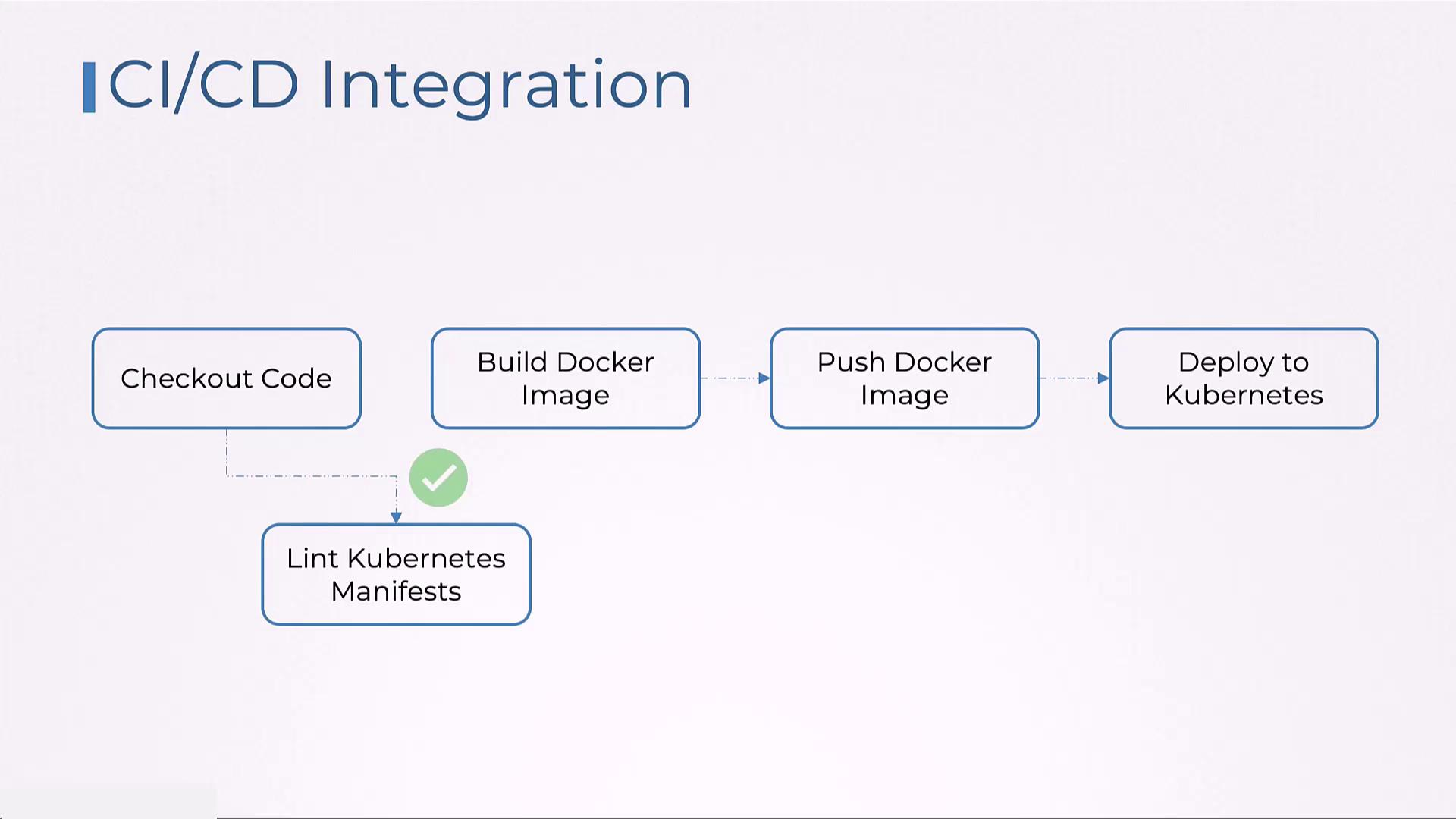
KubeLinter Lab
$ kube-linter lint ./nginx.yml

KubeLinter 0.8.1

/root/nginx.yml: (object: <no namespace>/nginx-deployment apps/v1, Kind=Deployment) object has 3 replicas but does not specify inter pod anti-affinity (check: no-anti-affinity, remediation: Specify anti-affinity in your pod specification to ensure that the orchestrator attempts to schedule replicas on different nodes. Using podAntiAffinity, specify a labelSelector that matches pods for the deployment, and set the topologyKey to kubernetes.io/hostname. Refer to https://kubernetes.io/docs/concepts/scheduling-eviction/assign-pod-node/#inter-pod-affinity-and-anti-affinity for details.)

/root/nginx.yml: (object: <no namespace>/nginx-deployment apps/v1, Kind=Deployment) container "nginx" does not have a read-only root file system (check: no-read-only-root-fs, remediation: Set readOnlyRootFilesystem to true in the container securityContext.)

/root/nginx.yml: (object: <no namespace>/nginx-deployment apps/v1, Kind=Deployment) container "nginx" is not set to runAsNonRoot (check: run-as-non-root, remediation: Set runAsUser to a non-zero number and runAsNonRoot to true in your pod or container securityContext. Refer to https://kubernetes.io/docs/tasks/configure-pod-container/security-context/ for details.)

Error: found 3 lint errors
apiVersion: apps/v1
kind: Deployment
metadata:
  name: nginx-deployment
  labels:
    app: nginx
spec:
  replicas: 3
  selector:
    matchLabels:
      app: nginx
  template:
    metadata:
      labels:
        app: nginx
    spec:
      securityContext:
        runAsUser: 1000
        runAsNonRoot: true          # 추가: non-root 실행 보장
      containers:
      - name: nginx
        image: nginx:1.14.2
        ports:
        - containerPort: 80
        securityContext:             # 추가: 컨테이너 레벨 보안 컨텍스트
          readOnlyRootFilesystem: true   # 읽기 전용 루트 파일시스템
          allowPrivilegeEscalation: false # 권한 상승 방지 (추가 권장)
        resources:
          requests:
            memory: "64Mi"
            cpu: "250m"
          limits:
            memory: "128Mi"
            cpu: "500m"
- Anti-Affinity
preferredDuringSchedulingIgnoredDuringExecution- Soft → 가급적 멀티 노드를 구성함
requiredDuringSchedulingIgnoredDuringExecution- Hard → 반드시 멀티 노드를 구성함
- 조건이 만족되지 않으면
Pending상태로 대기
- 조건이 만족되지 않으면
- Hard → 반드시 멀티 노드를 구성함
apiVersion: apps/v1
kind: Deployment
metadata:
  name: nginx-deployment
  labels:
    app: nginx
spec:
  replicas: 3
  selector:
    matchLabels:
      app: nginx
  template:
    metadata:
      labels:
        app: nginx
    spec:
      affinity:
        podAntiAffinity:
          preferredDuringSchedulingIgnoredDuringExecution:
          - weight: 100
            podAffinityTerm:
              labelSelector:
                matchLabels:
                  app: nginx
              topologykey: kubernetes.io/hostname
      securityContext:
        runAsNonRoot: true
        runAsUser: 1000
      containers:
      - name: nginx
        image: nginx:1.14.2
        securityContext:
          readOnlyRootFilesystem: true
          allowPrivilegeEscalation: false
        ports:
        - containerPort: 80
        resources:
          requests:
            memory: "64Mi"
            cpu: "250m"
          limits:
            memory: "128Mi"
            cpu: "500m"
![[CKS] Mutable vs Immutable Infrastructure & Audit Log](https://images.unsplash.com/photo-1454165804606-c3d57bc86b40?crop=entropy&cs=tinysrgb&fit=max&fm=jpg&ixid=M3wxMTc3M3wwfDF8c2VhcmNofDF8fEF1ZGl0fGVufDB8fHx8MTc2OTQzMDY5Mnww&ixlib=rb-4.1.0&q=80&w=960)
![[CKS] Supply Chain Security (3)](https://images.unsplash.com/photo-1763144536757-d90b9144e6ef?crop=entropy&cs=tinysrgb&fit=max&fm=jpg&ixid=M3wxMTc3M3wwfDF8c2VhcmNofDV8fFNlY3VyaXR5JTIwU2NhbnxlbnwwfHx8fDE3NjkwODkzMTl8MA&ixlib=rb-4.1.0&q=80&w=960)
![[CKS] Supply Chain Security (1)](https://images.unsplash.com/photo-1700716465891-9e5e9f501d7d?crop=entropy&cs=tinysrgb&fit=max&fm=jpg&ixid=M3wxMTc3M3wwfDF8c2VhcmNofDZ8fFN1cHBseSUyMENoYWlufGVufDB8fHx8MTc2ODc0NDA2N3ww&ixlib=rb-4.1.0&q=80&w=960)
![[CKS] Pod to Pod Encryption (Cilium)](https://images.unsplash.com/photo-1667372283587-e1557c08aca4?crop=entropy&cs=tinysrgb&fit=max&fm=jpg&ixid=M3wxMTc3M3wwfDF8c2VhcmNofDV8fEVuY3J5cHRpb258ZW58MHx8fHwxNzY4NjM5NTA1fDA&ixlib=rb-4.1.0&q=80&w=960)